
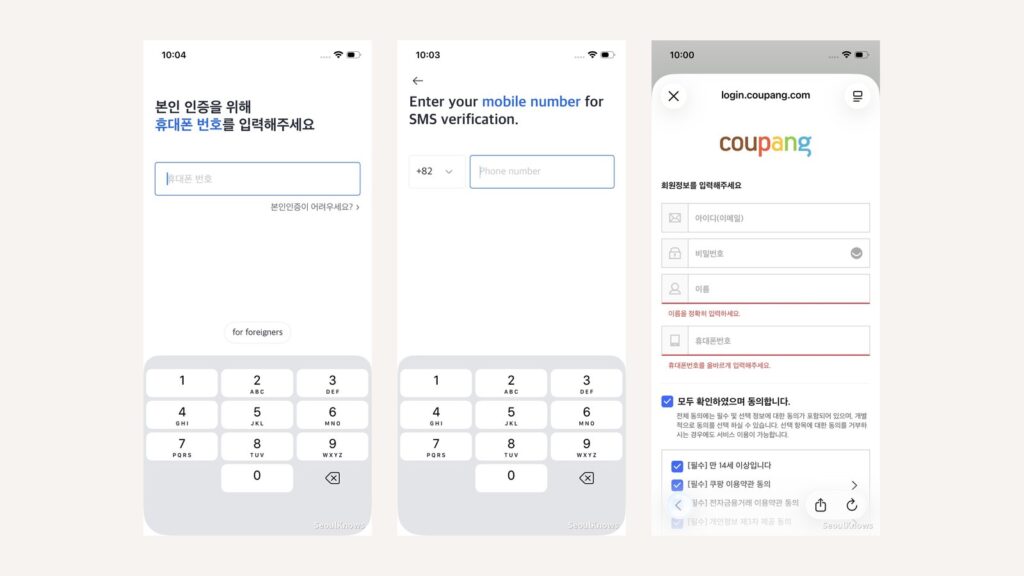
If you’re searching “do I need an eSIM in Korea”, you’ve probably already found twenty articles telling you the same thing: buy an eSIM, here’s a plan grid, here’s how to install it. What almost none of them tell you is the one thing that actually catches visitors out, and it isn’t the phone number everyone warns you about.
We went through the signup screens ourselves and checked the current prices. This guide covers what an eSIM actually gives you, a pricing quirk worth a few dollars, which Korean apps really work without a Korean number, and the one thing to do before you fly.
The short answer
Yes, an eSIM is the right choice for most trips to Korea. You land, it’s already working, and you skip the airport queue entirely. Coverage is a non-issue here. Korean networks reach into subway tunnels and up mountains.
What an eSIM does not give you is a Korean phone number, and you’ll find plenty of advice online claiming that locks you out of Korean apps. It mostly doesn’t. Kakao T, the taxi app you’ll actually want, has a foreign-visitor signup path with a full international country-code list.
The real trap is subtler: a data-only eSIM can’t receive text messages. And almost every account you’ll want in Korea is verified by text. Set those up before you fly and you’ll have no problems at all. Land first and set them up after, and you may find yourself locked out of the exact apps you came prepared to use.
That’s the whole article in four sentences. The rest is detail.
What you’re actually buying
| Data eSIM | Korean prepaid SIM (airport) | |
|---|---|---|
| Mobile data | Yes | Yes |
| Korean phone number (010) | No | Yes |
| Receives SMS | No | Yes, free, and it matters |
| Sends SMS, makes calls | No | Only on the data+voice version |
| Working before you land | Yes. Install ahead, activate on arrival | No |
| Airport queue | None | Yes |
| Price | $11 for 30 days, 5 GB | ₩27,500 for 5 days, unlimited |
Airport SIM figures are LG U+’s published prices for their data-only visitor SIM: ₩6,500 for one day, ₩12,000 for two, ₩18,000 for three, ₩23,000 for four, ₩27,500 for five. Unlimited 5G/LTE, no speed cap. Pickup at Incheon Terminal 1 arrivals, Gate F (24 hours) or Gate A (6am to 10pm); Terminal 2 arrivals, Gate 3 (24 hours) or Gate 8 (6am to 10pm).
An eSIM is a data pipe. That’s it, and for most travelers that’s enough: maps, translation, messaging, ride-hailing and search all run on data. Voice calls and SMS are the two things you give up, and in 2026 almost nobody misses the calls.
The SMS is a different story, and it’s the one thing in this article worth slowing down for.
A pricing quirk worth knowing before you buy
We went through Airalo’s Korea plans line by line, and there’s a pattern the plan grid hides. Look at 5 GB at three different durations:
| Duration | Data | Price |
|---|---|---|
| 7 days | 5 GB | $10.00 |
| 15 days | 5 GB | $10.50 |
| 30 days | 5 GB | $11.00 |
Quadrupling the validity period costs one dollar. You’re paying for gigabytes, not days. Duration is almost free.
The practical takeaway: there is very little reason to buy a 7-day plan. If your trip is five days, buy the 30-day plan anyway. It costs a dollar more, and it means a delayed flight, an extended stay, or a slow start on activation day never becomes a problem.
The other thing the grid hides: the 7-day 3 GB plan is $9.00, and the 7-day 5 GB plan is $10.00. One dollar buys you two extra gigabytes. The 3 GB plan is a trap. It exists to make the 5 GB plan look reasonable, and it works.
How much data do you actually need? Maps, messaging, translation and search are light. 5 GB comfortably covers a week if you’re on hotel wifi at night. What burns data is video: streaming on the KTX, uploading reels, video calls home. If that’s your trip, go to 10 GB. If it isn’t, 5 GB for 30 days at $11 is the plan to buy.
Prices checked August 2026. Airalo’s Korea plans run on SK Telecom.
What works fine without a Korean number
Most of your trip, honestly.
- Naver Map and KakaoMap: Korea’s real navigation apps. Both work without an account.
- Papago: translation, no signup.
- Subway apps: Subway Korea, Kakao Metro.
- Google, email, browsers, booking sites: all of it.
- Your own messaging apps: WhatsApp, Telegram, Line, iMessage, all fine on data.
You can navigate Seoul, eat well, ride the subway and translate a menu without a Korean number, an account, or a single word of Korean.
The Google Maps problem
This one isn’t about eSIMs at all, but it catches almost every first-time visitor, so it belongs here.
Google Maps does not give walking or driving directions in Korea. Transit directions work. Everything else doesn’t. This is a mapping-data export restriction, not a bug or a connectivity issue. No SIM, eSIM or VPN fixes it.
Download Naver Map or KakaoMap before you arrive. Both have English interfaces. Naver Map is generally better for walking and transit; KakaoMap is better for taxis. Take either one.
If you land expecting Google Maps to work the way it does everywhere else, your first afternoon in Seoul will be considerably worse than it needed to be.
The actual trap: SMS verification
Kakao T, Korea’s dominant taxi app, signs foreigners up perfectly happily. During registration it asks whether you’re a foreign visitor, and hands you a full international country-code list to verify your own number against. There’s no Korean number requirement anywhere in the flow.
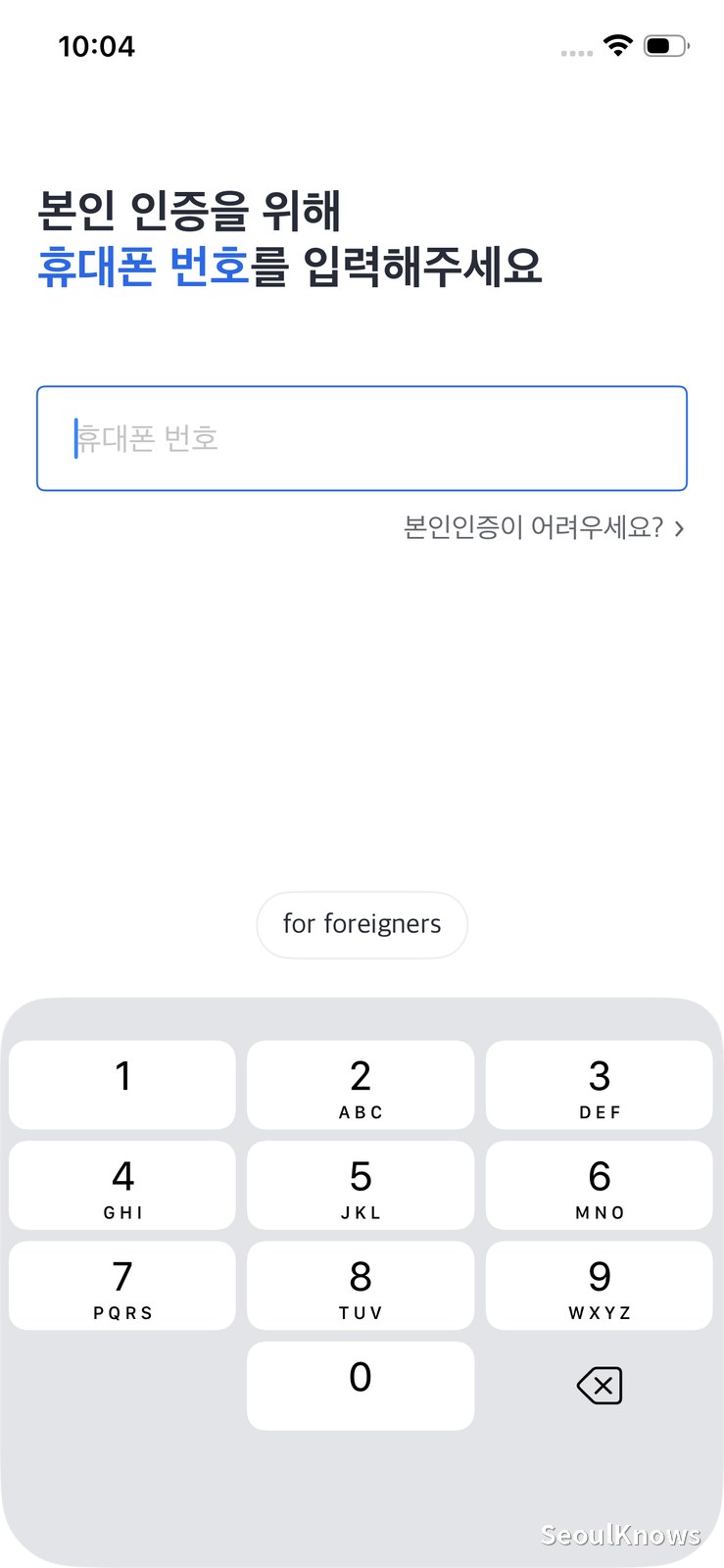
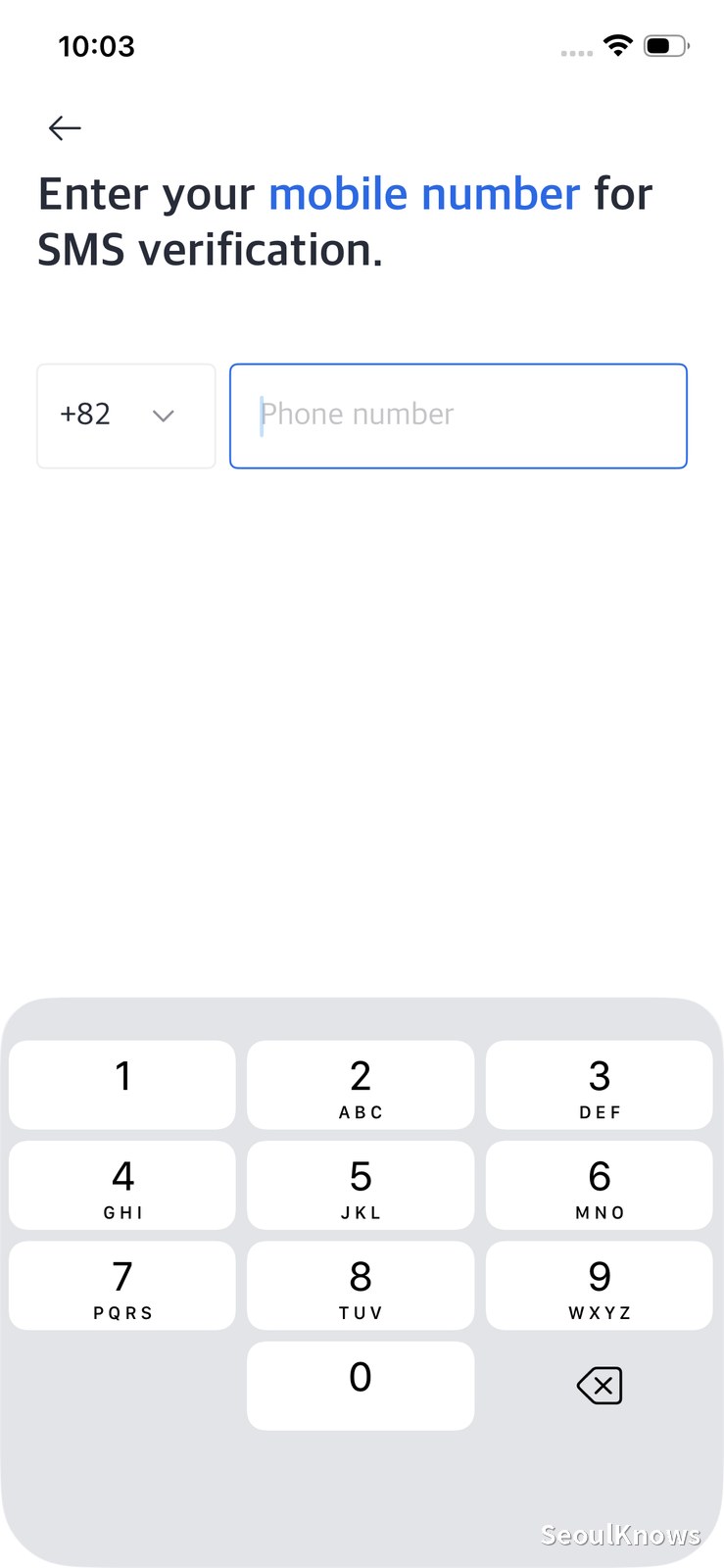
Kakao T’s verification screen has a “for foreigners” button at the bottom. Tap it and you get an English screen with an international country-code selector, and no Korean number is needed.
So the widely repeated advice that you’re locked out of Korean apps without a Korean number is, at least for the app you’ll use most, simply wrong.
What the signup does need is a text message.
If you’re on a data-only eSIM, your eSIM line can’t receive texts. Whether you get the verification code depends entirely on whether your home number is still reachable, which means keeping your original SIM active with roaming enabled. Many travelers do the opposite: they install the eSIM, disable their home line to avoid roaming charges, and only then discover they can’t receive a code.
So: do it before you fly. While you’re still at home, on your own network, with reliable SMS:
- Install Kakao T and register: choose the foreign visitor option, verify with your own number.
- Install Uber as a backup: same idea, takes two minutes.
- Notify your bank you’ll be travelling.
Ten minutes at home saves a genuinely frustrating hour in Korea. This is the single most useful thing in this article, and it’s true regardless of what your carrier does or which eSIM you buy.
If you’d rather not think about any of this, there’s a shortcut: buy the physical prepaid SIM at the airport instead. It comes with a Korean 010 number, and while the data-only version can’t send texts, it receives them for free, which is all a verification code needs. Any Korean signup you attempt after landing will just work. You’ll pay more (₩27,500 for five days against $11 for a month of eSIM data) and you’ll queue on arrival, but you’re buying the problem away entirely.
One more step: the payment screen
Once you’re into Kakao T, it asks for a card. Foreign-issued cards are frequently rejected here. Don’t fight it:
- At the card screen, tap Later and skip it.
- Before calling a ride, set the payment method to Pay to Driver.
- Pay the driver directly at the end, by card or cash.
Korean taxis take foreign cards at the terminal without any trouble. It’s only the in-app registration that’s fussy.
Uber works too
Uber’s signup also accepts international phone numbers, and in Seoul it dispatches regular Korean taxis, the same cars Kakao T sends. It’s a reasonable backup if Kakao T gives you trouble, and it’s one less unfamiliar interface to learn.
Kakao T has far more drivers on it, so it’s the one to lead with. But installing both before you fly costs nothing, and having a second option at 1am in the rain is worth the two minutes.
What genuinely doesn’t work
We checked the signup screens. On these, the phone field has no country selector at all. It accepts Korean numbers only, full stop:
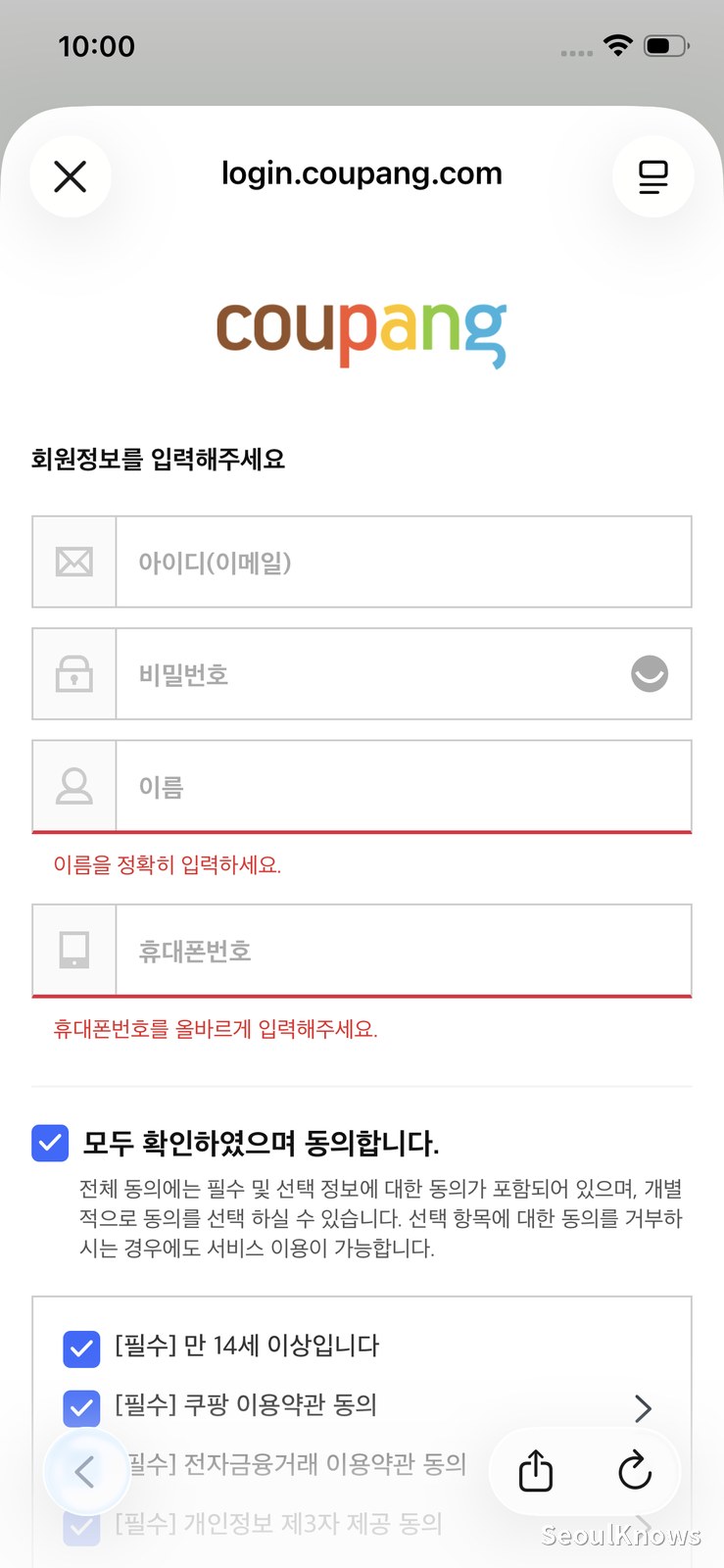
Coupang’s signup, by contrast: a phone field with no country selector anywhere.
- Coupang Eats: email plus a Korean phone number, no international option.
- Baemin (배달의민족): the same.
Go one step further into these services and you hit the real reason: 본인인증, Korea’s identity verification step, which asks for a 주민등록번호, the national ID number every Korean resident has and no visitor does. A phone number was never the barrier. The barrier is being in the national identity system, and a tourist isn’t.
That’s also why Korean e-commerce, ticketing sites and reservation apps like CatchTable tend to stop you at the same wall.
This sounds worse than it is. Losing delivery is a real loss at 11pm on a rainy night. But walking into restaurants is how you should be eating in Seoul anyway, and the places worth your time mostly don’t take reservations from anyone.
eSIM, airport SIM, or pocket wifi?
| Your situation | What to get |
|---|---|
| 3 to 10 days, sightseeing, maps and messaging | eSIM. No reason to queue |
| You set up your apps before flying | eSIM. You’ve already solved the only real problem |
| You didn’t, and you’ll need Korean SMS codes here | Airport SIM. Its number receives texts |
| Heavy data use: streaming, uploading, video calls | Airport SIM. Unlimited, no speed cap |
| Two weeks or more | Airport SIM. A Korean number compounds in usefulness |
| You want delivery apps and Korean sites | Airport SIM, and even then expect friction |
| Korea plus Japan or another Asian stop | eSIM, regional plan |
| Travelling as a group, several devices | Compare pocket wifi: one device, everyone shares |
| Phone doesn’t support eSIM, or is carrier-locked | Physical SIM, no choice |
For the large majority of visitors (a week or two, sightseeing, eating, using maps) the eSIM is the correct answer, and the decision doesn’t deserve more thought than this.
Frequently asked questions
Can I get a Korean phone number as a tourist?
Yes, with a prepaid SIM from an airport counter or a carrier shop. You’ll need your passport. This is the only way to get a real 010 number as a short-term visitor. No data eSIM provides one. Note that the cheaper data-only SIMs give you a number that receives calls and texts but can’t place or send them; if you need outgoing calls, ask for the data+voice version.
Where exactly are the SIM counters at Incheon?
Arrivals level, not departures. At Terminal 1, Gate F is open 24 hours and Gate A runs 6am to 10pm; at Terminal 2, Gate 3 is 24 hours and Gate 8 runs 6am to 10pm. If you’re being sent up to the departure hall, that’s the counter for Koreans buying SIMs to use abroad. Wrong product.
Does Airalo work in Korea?
Yes. Their Korea plans run on SK Telecom, which has comprehensive national coverage including subway tunnels. Coverage genuinely isn’t something you need to research here.
Can I use one eSIM in both Korea and Japan?
Yes: buy a regional Asia plan rather than a country plan. Airalo’s Asia plans start around $4.
Is airport wifi enough to get me started?
Incheon has good free wifi, and so do most cafes, subway stations and convenience stores. You could technically survive on wifi alone. We don’t recommend it. The gap between wifi points is exactly where you need a map.
Should I install the eSIM before or after I land?
Install before, activate after. Installation needs a stable internet connection, so do it at home. Most plans start counting from first connection to the network, not from purchase.
The bottom line
Buy the eSIM. Buy the 30-day plan even for a short trip, because the days are nearly free. Then spend ten minutes before your flight installing Kakao T and Uber while you can still receive a text. That’s the step nobody tells you about, and it’s the one that actually matters. If that sounds like too much bother, the airport SIM costs more and solves it for you.
Either way, download Naver Map before you get on the plane.
Heading out of Seoul by train? Our Seoul Station guide covers KTX booking, luggage storage and the things that catch people out, and the Suseo Station guide does the same for the SRT.
Prices and app behaviour checked August 2026. Things change; if you find something here that’s out of date, tell us and we’ll fix it.

Written by WY, a Seoul-based local sharing honest, first-hand guides to Korea. Every guide starts with a real visit: I go, I check, and I write down what I found, including the parts that weren’t great. Where a link earns SeoulKnows a small commission it’s clearly marked, and it never changes what I write. More about me →